Contacts & directory
Contacts & directory is where you control what admins and viewers can see in the contact directory. You reach it from Team > Configuration > Contacts & directory. Only admins can change these settings.
Contact directory visibility
Section titled “Contact directory visibility”Choose what admins and viewers can see in the contact directory. Two axes, admin visibility and viewer visibility, so you can match the privacy posture your regulator and your team expect.
These settings control who can see a contact record. They do not change what Comma retains.
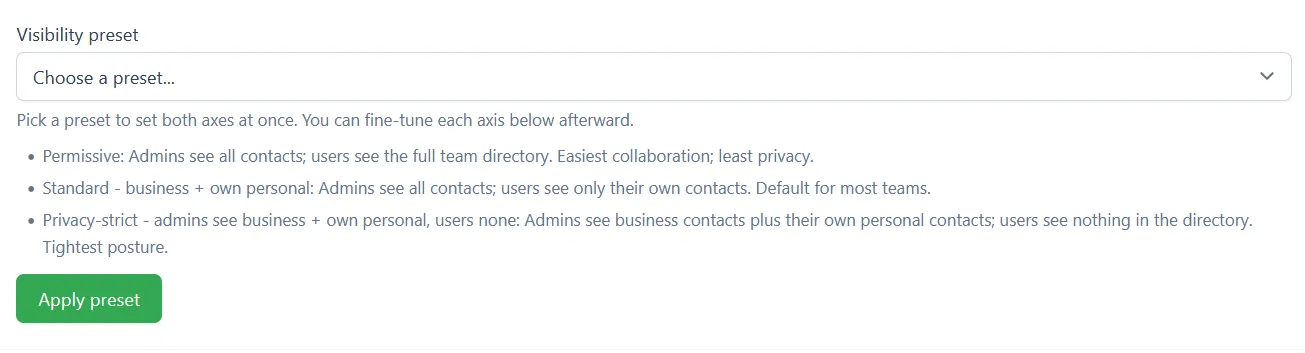
Visibility preset
Section titled “Visibility preset”Pick a preset to set both axes at once. You can fine-tune each axis below afterward.
- Permissive - Admins see all contacts; viewers see the full team directory. Easiest collaboration; least privacy.
- Standard - business + own personal - Admins see all contacts; viewers see only their own contacts. Default for most teams.
- Privacy-strict - admins see business + own personal, viewers none - Admins see business contacts plus their own personal contacts; viewers see nothing in the directory. Tightest posture.
Choose a preset, then click Apply preset.

Admin contact visibility
Section titled “Admin contact visibility”- All contacts (business + personal) - Admins can see every contact on the team, both business contacts and the personal contacts owned by everyone else on the team. Most permissive.
- Business + own personal contacts - Admins see all business contacts, but only their own personal contacts. Personal contacts owned by anyone else stay hidden.
Click Save admin visibility to apply the change.

Viewer contact visibility
Section titled “Viewer contact visibility”This axis covers what viewers can see. It applies to the contact records themselves, not to message content.
- Full team directory - Viewers can browse the full team-wide contact directory. Use only if your team explicitly needs this collaboration mode.
- Own contacts only - Viewers see only the contacts they have communicated with. Default and recommended.
- None - Viewers see no contact directory at all. The Contacts navigation item is hidden. Use for the strictest privacy posture.
Click Save viewer visibility to apply the change.

Current state
Section titled “Current state”The panel at the bottom of the screen shows the two settings currently in effect, one for admin visibility and one for viewer visibility.